Free printable + spreadsheet

Debt snowball tracker and spreadsheet

Download a printable debt snowball tracker you can color in as each balance drops, plus a free spreadsheet that works out your payoff order, the month each debt should be paid off, and your estimated debt-free date.

Use the spreadsheet to set the plan, then keep the printable somewhere you’ll see it. Each month, check what you owe against the plan so you know whether you’re ahead or falling behind.

Download the debt snowball tracker

Both files are free, and you don’t need an email address or an account to download them.

Last updated: November 2026
Calculated Excel workbook

Debt Snowball Spreadsheet

A spreadsheet that takes your balances, APRs, minimum payments, and extra monthly amount, then works out your payoff order, each debt’s payoff month, your total interest, and your debt-free month.

Best for Seeing when each debt should be paid off before you commit to a monthly payment.
Includes Snowball or avalanche order for up to 10 debts, a month-by-month payoff schedule with a chart, and a monthly tracker that compares what you owe with the plan.
Good to know Opens in Excel and Google Sheets. In Excel, everything except the yellow cells is locked so the formulas stay intact. Google Sheets doesn’t keep those locks, so stick to the yellow cells there.
The spreadsheet adds interest once a month (APR ÷ 12). Lenders that charge daily interest or use their own minimum-payment formula can land a little off from these dates.

What’s inside the tracker and spreadsheet

The spreadsheet sets the plan. The printable keeps it in front of you and gives you a place to record each month’s check-in.

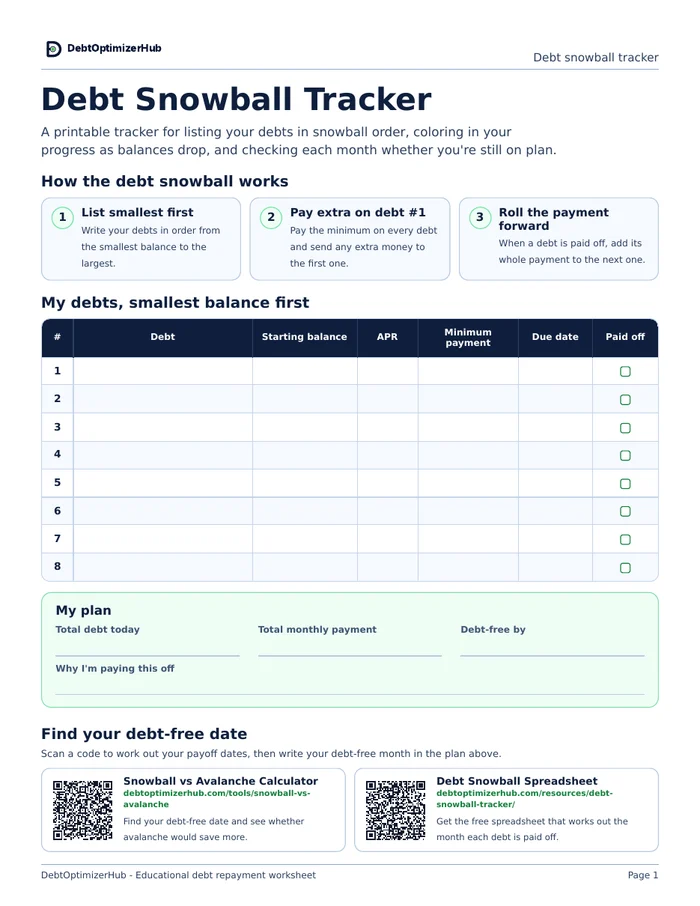
First page of the printable debt snowball tracker with a debt list, a plan box, and QR codes to the calculators Debt list and plan

List your debts from the smallest balance to the largest, check each one off when it’s paid, and write in your debt-free month.

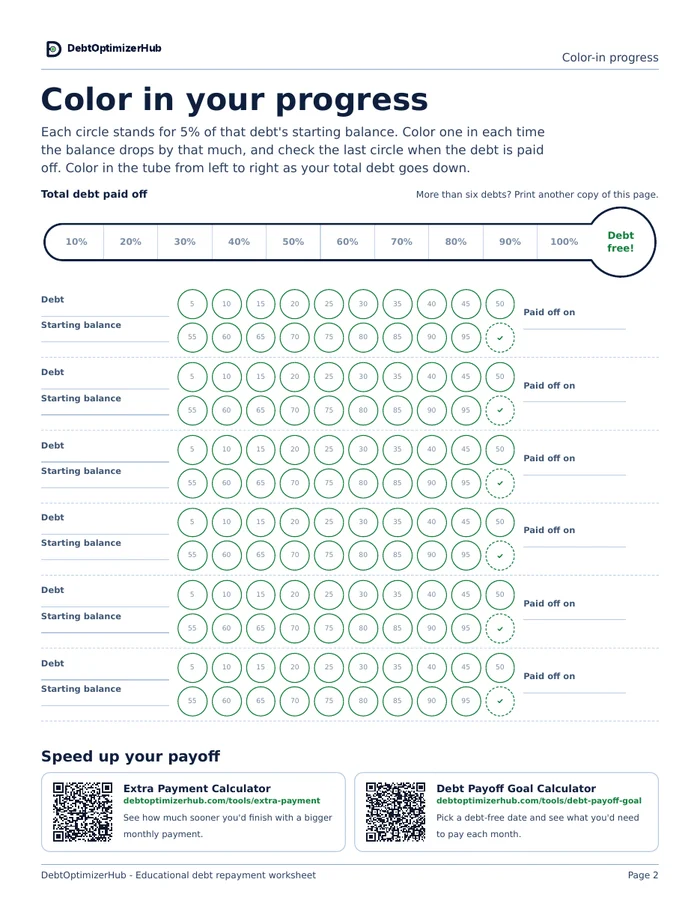
Color-in page of the debt snowball tracker Color-in progress

Each circle is 5% of a debt’s starting balance, and the thermometer tracks how much of your total you’ve paid off.

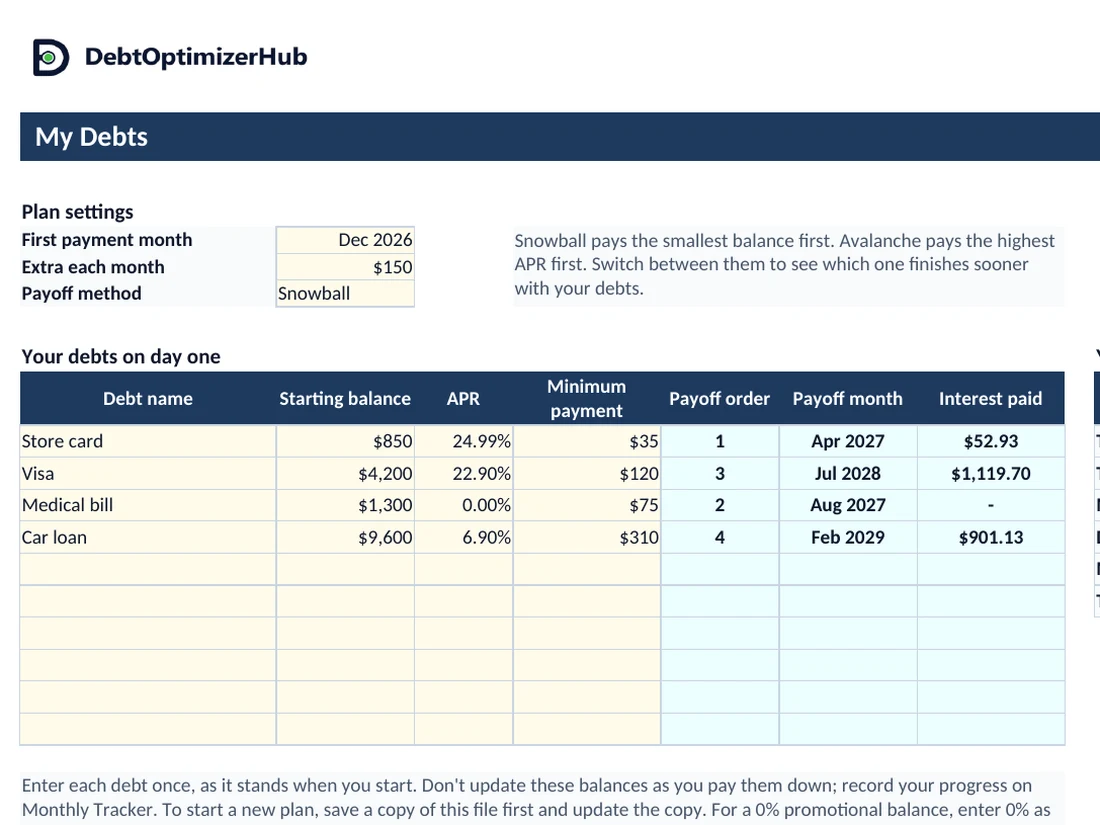
My Debts tab of the debt snowball spreadsheet showing four example debts, their payoff months, and a plan summary Spreadsheet plan

Enter your debts once and the spreadsheet fills in your payoff order, payoff months, total interest, and debt-free month.

How the debt snowball works

You list your debts from the smallest balance to the largest, pay the minimum on every debt, and send any extra money to the smallest one. When it’s paid off, its full payment rolls into the next debt on the list, so each new target gets a bigger payment than the last one did.

Step 1 List your debts smallest first.

Order them by balance. If two balances are close, put the one with the higher APR first.

Step 2 Put your extra money on debt #1.

Keep paying the minimum on everything else so nothing falls behind while you work on the first debt.

Step 3 Roll the payment forward.

When a debt is paid off, add its whole payment to the next one instead of spending it.

Debt snowball example

This is the example that comes filled in on the spreadsheet: four debts totaling $15,950 with $540 in minimum payments. With $150 extra each month, the total payment is $690, starting in December 2026.

Payoff orderDebtBalanceAPRMinimum paymentPaid off
1Store card$85024.99%$35April 2027
2Medical bill$1,3000%$75August 2027
3Visa$4,20022.9%$120July 2028
4Car loan$9,6006.9%$310February 2029

With the snowball, this household is debt-free in February 2029, 27 months after starting, and pays $2,073.76 in interest. The store card is gone after five payments, and that early payoff is what the snowball is built around: it gives you a win while the bigger debts are still barely moving.

Should you use the snowball or the avalanche?

The avalanche sends your extra money to the highest APR first instead of the smallest balance. With the same four debts and the same $690 a month, the avalanche finishes in January 2029, one month sooner, and saves $96.68 in interest. The tradeoff is that the medical bill isn’t paid off until month 18, so you wait longer between payoffs.

When the difference is this small, the order you’ll keep following usually matters more than the extra savings. When the avalanche would save hundreds or thousands, it’s worth a closer look. You can switch between the two on the spreadsheet, or compare them side by side in the Snowball vs Avalanche Calculator.

Calculators and guides to use with the tracker

Use these when you want to test a different payment or a target date before you update your plan.

Debt snowball tracker FAQ

How do I open the spreadsheet in Google Sheets?

Download the file, upload it to Google Drive, and open it with Google Sheets. The formulas work the same way they do in Excel. Google Sheets doesn’t keep the cell locks from Excel, though, so only type in the yellow cells.

What if my balances change or I fall behind?

Leave the balances on My Debts as they were when you started. They’re the plan you’re measuring against, so changing them later rewrites the plan and the comparison with it. Record what you owe each month on Monthly Tracker instead. If you want a fresh plan, save a copy of the file first and update the copy, so the original still shows how you’ve done against your first plan.

Does the spreadsheet send my numbers anywhere?

No. It’s a regular file that stays on your computer or in your own Google Drive, and nothing you enter is sent to DebtOptimizerHub.

How accurate are the payoff dates?

They’re estimates. The spreadsheet adds one month of interest to each balance, pays every minimum, and sends what’s left to the debt you’re working on. If your lender charges daily interest or figures minimum payments differently, your dates can shift a little, so update your balances every month or two to keep the plan close.

What if I can’t cover my minimum payments?

A payoff order won’t fix that on its own. A nonprofit credit counseling agency can go over your budget with you and may be able to set up a repayment plan with lower interest rates. The National Foundation for Credit Counseling lists member agencies.

Can I share the tracker?

Yes. Share the link to this page so people get the latest version, and print as many copies as you need.

Important planning notes

  • The printable tracker doesn’t calculate payoff time or interest. Use the spreadsheet or the calculators for those estimates.
  • The spreadsheet assumes no new purchases, fees, missed payments, or rate changes. If any of those happen, update your balances and APRs.
  • Promotional APRs, penalty APRs, and issuer-specific minimum-payment formulas can change your actual payoff dates.
  • These resources are educational estimates and shouldn’t be treated as financial advice.
Written by Michael Brady

Michael Brady is a software developer and the creator of DebtOptimizerHub's financial calculators and research. Calculations and worked examples are checked against the site's calculation methodology and verification standards. See the editorial policy for sourcing, review, and correction standards.